Up next in 10

Learn how common speed and image optimization plugins are unable to provide proper site speed and Core Web Vitals, and how Ezoic Leap can get you the site speed and Core Web Vitals that you want.
Leap is Ezoic’s completely free website performance tool designed to be an all-in-one app to diagnose and address each site’s performance issues, one-by-one, so that every site can achieve good Core Web Vitals and excellent performance for their readers. The tool includes optimization settings that render other speed and caching plugins obsolete.
Show More Show Less View Video Transcript
0:00
Leap is Ezoic's completely free website performance tool, designed to be an all-in-one app to
0:11
diagnose and address each site's performance issues, one by one, so that every site can
0:16
achieve good core web vitals and excellent performance for their readers. The tool includes optimization settings that render other speed and caching plugins obsolete
0:26
You may be wondering how Leap can perform against some of the most popular plugins out
0:29
there. Today I'm going to show you four plugins often used by publishers and how they perform
0:34
against Leap regarding core web vitals and overall site speed, and why you no longer
0:38
need multiple plugins to do what Leap can do all on its own
0:43
First we have Imageify. Imageify is a popular image optimization plugin used to resize and
0:48
compress images to make websites load faster. Here we have Imageify activated on a website
0:54
in aggressive mode. Auto-optimize images on upload and backup original images are selected
0:59
Additionally, we have it set to create WebP versions of images, to resize images to a
1:04
maximum width of 2,560 pixels, and to automatically optimize specific image sizes
1:11
Next we also have WP Rocket installed. WP Rocket is a popular caching plugin that claims
1:16
to improve the speed, SEO rankings, and conversions of your WordPress site
1:21
Here we have Enable Caching for Mobile Devices turned on. We also have CSS Files, Combine
1:26
CSS Files, Optimize CSS Delivery, Minify JavaScript Files, Combine JavaScript Files, Load JavaScript
1:32
Deferred, and Delay JavaScript Execution. Preloading to cache and enable link preloading is also turned on
1:40
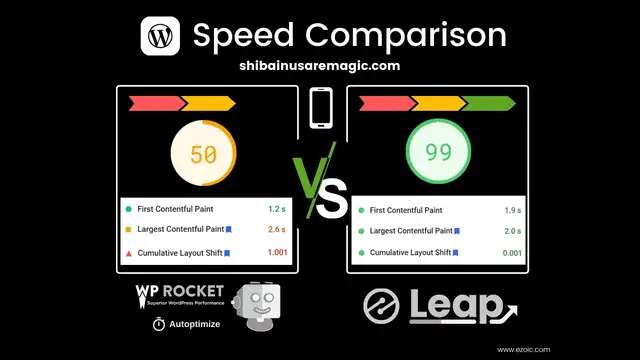
Now, these two popular speed plugins activated, what do we get for our site speed and core
1:44
web vitals? We tested using PageSpeed Insights multiple times. The desktop version of the
1:50
site is doing well, but if we look at the mobile PageSpeed, it ranges from 79 to 86
1:55
and the core web vitals are not where they should be. These poor core web vitals appear
1:59
every time we tested the mobile site using Imageify and WP Rocket
2:03
Now let's deactivate those plugins and just use Ezoic Leap to optimize for site speed
2:07
and core web vitals. We'll want to log out of WordPress so we can use the preview link
2:11
of the website before fully activating any version of Leap. By clicking Get Started
2:16
certain settings will already be activated to optimize CSS, images, the cache policy
2:21
pre-connecting origins, minifying, script execution, and iframes. You can preview how fast these settings are by clicking Next and then selecting Go to Preview
2:31
If we copy the preview link and take it to PageSpeed Insights, we can test the settings
2:34
before pushing them live on our site. Testing this preview multiple times, we got a mobile
2:39
PageSpeed score ranging between 97 and 99, and all green core web vitals
2:44
We ran the same tests on two other popular speed optimization plugins, AutoOptimize and
2:49
ShortPixel. AutoOptimize is used to aggregate, minify, and cache scripts and styles, amongst
2:54
other optimizations. ShortPixel is used to optimize and compress images. We have both of these activated and used the website URL to test PageSpeed. We see that
3:03
these plugins only achieved a mobile score between 58 and 63 with poor core web vitals
3:08
and desktop received between a 77 and 92, and with an issue of some core web vitals
3:13
as well. After deactivating the plugin and then logging out of WordPress once more, we
3:17
want to make sure EZOit caching is on. Next, just as before, we turn on Leap and take
3:23
the preview link to PageSpeed Insights. Now the site is receiving mobile PageSpeed
3:30
scores ranging between 96 and 98, and a desktop PageSpeed score between 99 and 100, all with
3:35
great core web vitals. Leap was built to identify issues in actionable
3:39
ways, address fundamental speed solutions with cutting-edge features, provide simple directions to complex problems, and highlight the root cause of poor timings or metrics
3:48
and makes optimizing your site simpler than ever
Business Services
Software
Web Design & Development
People & Society